How to Do a Simple SEO Audit in 30 Minutes (Beginner-Friendly Guide)

Follow Us:

How to Do a Simple SEO Audit in 30 Minutes (Beginner-Friendly Guide)
Go Back

Table of contents:


How to Do a Simple SEO Audit in 30 Minutes (Beginner-Friendly Guide)

If your website isn’t ranking or your traffic has suddenly dropped, the fastest way to diagnose the problem is by doing a quick SEO audit. Most business owners think SEO audits are technical, time-consuming, and costly—but the truth is, you can learn how to do a simple SEO audit in just 30 minutes using easy tools.

This guide is designed for beginners, small business owners, and marketers who want a quick SEO audit, a basic SEO audit, or a fast SEO audit without complicated technical jargon. By the end of this tutorial, you’ll know how to perform an SEO audit, identify key SEO issues, and understand the SEO website audit process step by step.

Let’s get started with your simple SEO audit checklist, designed using trending SEO algorithm patterns for 2025.

Tools You Need to Perform a 30-Minute SEO Audit

You don’t need paid tools. All tools recommended here are free.
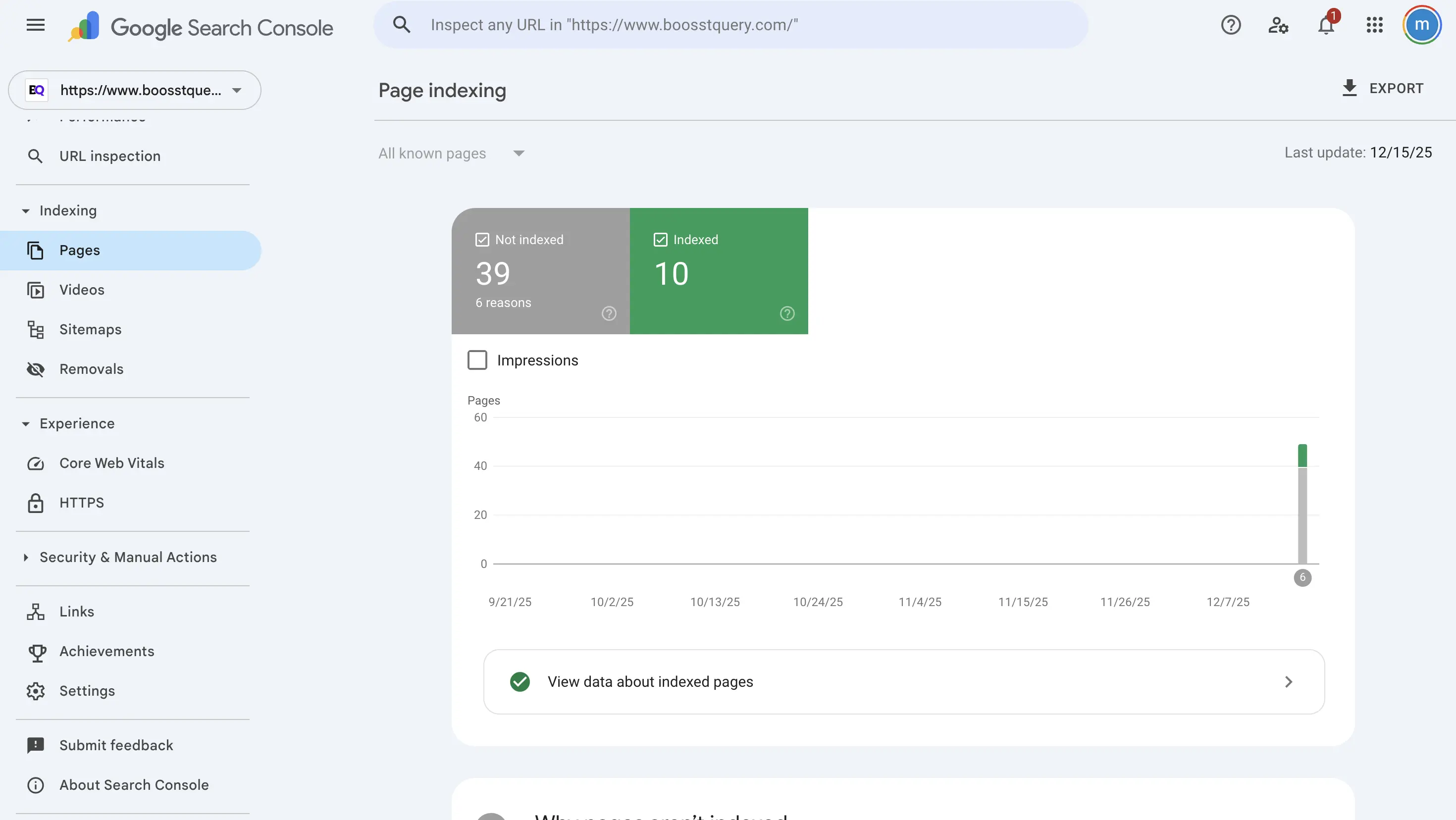
  • Google Search Console

Google search console

Find indexing issues, crawl errors, performance drops.

  • Google Analytics

Analyze user behavior, bounce rate, and conversions.

  • Google PageSpeed Insights

Check speed, Core Web Vitals, and UX signals.

  • Mobile-Friendly Test

Check mobile responsiveness.

  • GTmetrix

Check waterfall issues, loading delays, and speed bottlenecks.

  • Screaming Frog (Free Version)

Find broken links, missing meta tags, duplicate content.

  • Ubersuggest / Ahrefs Webmaster Tools

Check keyword gaps and SEO performance.

Using these tools, you can do a fast SEO audit efficiently.

Why You Need a 30-Minute SEO Audit (Before You Lose Traffic)

If your website has stopped ranking or leads have dropped, chances are you’re dealing with:

  • SEO errors affecting ranking
  • Poor on-page optimization
  • Slow speed
  • Weak content structure
  • Poor internal links
  • Missing technical SEO basics

These issues add up and cause a website not ranking SEO audit scenario—something most websites face every 6–12 months.

The good news? You can fix SEO issues fast if you learn how to do a simple SEO audit in 30 minutes.

Step 1: Check Your Website’s Visibility & Indexing (5 Minutes)

“Is my website visible on Google?”

This is the first question every SEO audit should begin with.

Check if Google has indexed your site

Search on Google: site:yourdomain.com

If only a few pages appear or you see “No results found,” your website has indexing issues.
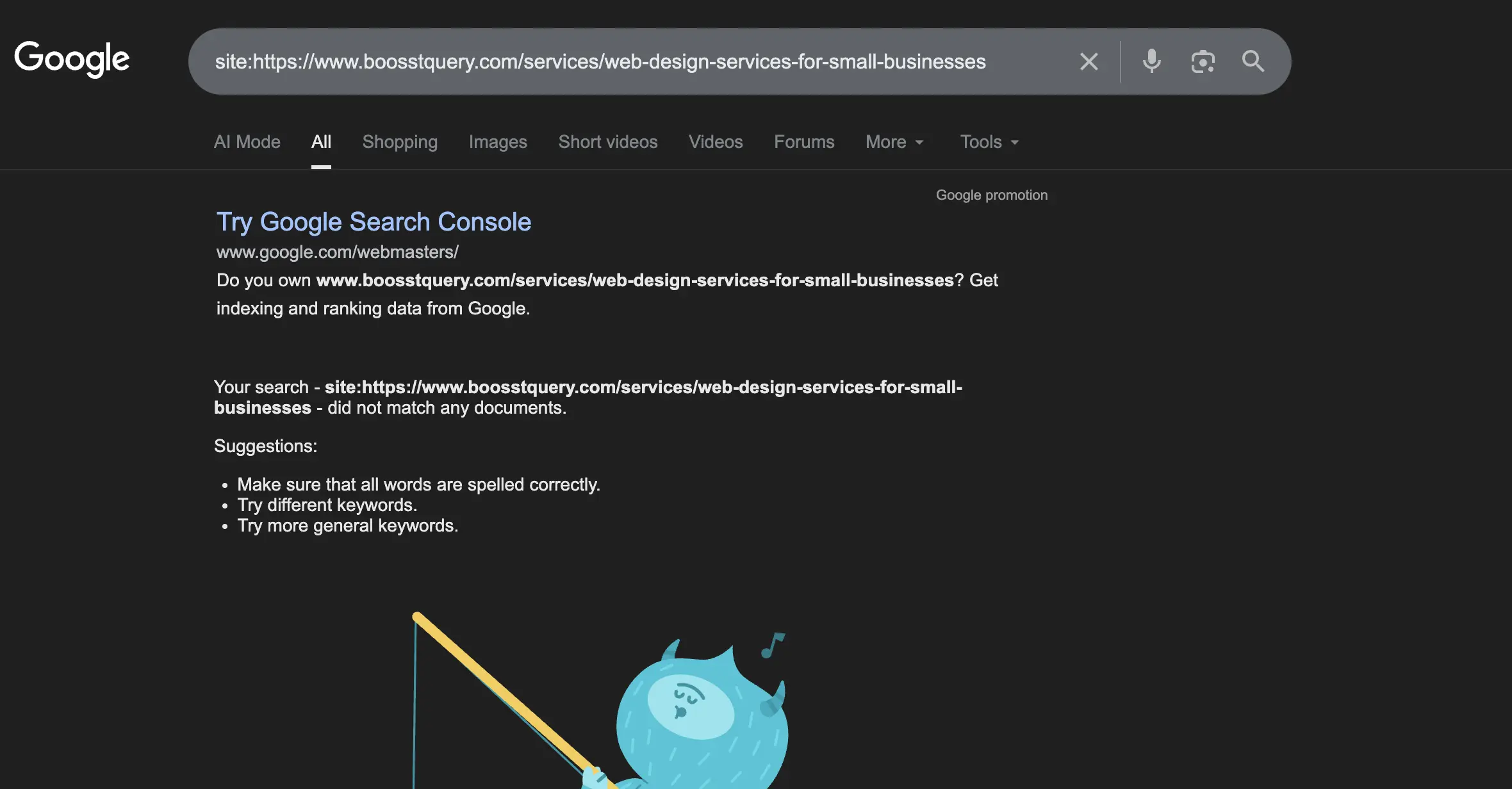
Site indexing issue

Signs of indexing problems:

  • Pages missing from search
  • Google not showing recent updates
  • Low impressions in Google Search Console

This step alone helps you identify SEO issues on your website quickly.

Fix:

  • Submit your sitemap
  • Request indexing
  • Remove “noindex” tags
  • Fix robots.txt errors

This is the foundation of your quick SEO audit checklist for small businesses.

Step 2: Analyze Page Speed (5 Minutes)

Slow websites destroy rankings and conversions. For a fast SEO audit, check your speed with:

  • Google PageSpeed Insights
  • GTmetrix
  • WebPageTest

Common speed issues:

  • Large images
  • Too many plugins
  • Slow hosting
  • Unoptimized scripts

If you see red warnings, your performance is part of the common SEO issues checklist.

Fix:

  • Compress images
  • Minify CSS & JS
  • Enable caching
  • Upgrade hosting

Fixing speed alone helps you improve ranking with SEO audit results instantly.

Step 3: Review On-Page SEO Elements (5 Minutes)

This is the core of any basic SEO audit.

Check these elements on your main pages:

  • H1 tag
  • Meta title & description
  • URL structure
  • Keyword placement
  • Image ALT text
  • Internal links

If these are missing, you're seeing classic SEO errors affecting ranking.

Fix:

Ensure each page has:

  • 1 main H1
  • Keyword in title
  • Natural keyword placement
  • Clean, readable URLs
  • Proper internal linking

This step alone boosts SEO significantly and is essential in how to check website SEO performance.

Step 4: Evaluate Content Quality (5 Minutes)

Weak content = weak rankings.
Ask yourself:

  • Is my content helpful?
  • Does it answer the search intent?
  • Is it better than competitors?
  • Is it updated?
  • Does it use EEAT principles?

If not, your content might be holding you back.

Signs of poor content:

  • Traffic dropping
  • High bounce rate
  • Low time on page
  • Pages ranking on page 3–10

These indicate it’s time to follow the 30 minute SEO audit for beginners framework.

Fix:

  • Update outdated blogs
  • Add missing sections
  • Improve readability
  • Add visuals (charts, screenshots)
  • Add expert insights
  • Better content = better SEO.

Step 5: Check Technical SEO Basics (5 Minutes)

This is where most non-SEO people panic—but it’s actually simple.

Check for:

  • Broken links
  • Mobile responsiveness
  • HTTPS certificate
  • Canonical tags
  • Duplicate content
  • Core Web Vitals

These elements make up the spine of the SEO website audit process.

Tools:

  • Google Search Console
  • Screaming Frog (Free version)
  • Sitebulb
  • Ahrefs site audit

If you find errors, you now know how to find SEO errors on your website easily.

Step 6: Analyze Your Backlinks (3 Minutes)

Backlinks still matter, and they play a huge role in ranking.

Check:

  • How many backlinks you have
  • Quality of linking websites
  • Spam links
  • Lost links
  • Toxic links

Tools:

  • Ahrefs
  • SEMrush
  • Ubersuggest
  • Moz

Backlink issues are one of the biggest reasons behind website not ranking SEO audit red flags.

Fix:

  • Disavow toxic links
  • Build new quality links
  • Update older pages to attract fresh links

This is a must for your fast SEO audit guide for small business owners.

Step 7: Evaluate User Experience & Design (3 Minutes)

Google heavily rewards websites that provide an easy, smooth experience.
Ask yourself:

  • Is navigation clean?
  • Can users find information quickly?
  • Is the design modern?
  • Are CTAs visible?

Many ranking problems come from poor UX.

Signs of UX issues:

  • High bounce rate
  • Low conversions
  • Low page engagement

This is part of how to identify SEO issues on your website from a user’s point of view.

Fix:

  • Improve CTAs
  • Simplify navigation
  • Improve layout spacing
  • Use clearer messaging

Step 8: Review Competitor Pages (2 Minutes)

This is powerful—and most beginners skip it.

Find out:

  • Why are competitors ranking above you?
  • What are they doing that you’re not?
  • How is their content structured?
  • Which keywords are they targeting?

This helps your quick SEO audit become smarter.

Fix:

  • Add missing keywords
  • Improve content depth
  • Match user search intent
  • Add EEAT signals they lack

Step 9: Check Internal Linking (1 Minute)

Internal links help Google and users navigate easily.

Check:

  • Do important pages link to each other?
  • Do blogs link to service pages?
  • Are there orphan pages?

Internal linking is often ignored yet it’s part of the quick on-page SEO audit checklist.

Fix:

  • Add links to relevant blogs
  • Strengthen topic clusters
  • Link to cornerstone pages

This step alone can significantly improve ranking with SEO audit changes.

Step 10: Analyze Your Keyword Strategy (1 Minute)

Your site might not be ranking because you’re targeting the wrong keywords.

Ask:

  • Am I targeting high-competition keywords?
  • Am I ignoring long-tail keywords?
  • Is my content aligned with search intent?

Fix:

Use more:

  • Low competition long-tail keywords
  • Pain point keywords
  • Questions and how-to keywords

This aligns with trending algorithms that prioritize helpful content.

How to Check Website SEO Performance (Beginner Level)

This section helps new beginners understand how to perform a simple SEO audit by checking measurable performance metrics.

Key Metrics to Monitor:

  • Organic clicks
  • Impressions
  • CTR
  • Bounce rate
  • Avg. position
  • Time on page
  • Conversions

Signs You Have SEO Problems

❌ Low impressions
❌ Falling rankings
❌ Low CTR
❌ High bounce rate
❌ Pages not indexing
❌ Slow load time
❌ Mobile errors

These are clear SEO errors affecting ranking.

Common SEO Issues Checklist 

Most websites suffer from the same problems. Here’s a quick checklist:

✔ Website not ranking SEO audit

If your site is not ranking, check:

  • keywords
  • speed
  • indexing
  • content quality
  • backlinks
  • broken links

✔ Fix SEO issues fast

  • improve page speed
  • fix indexing
  • optimize meta tags
  • compress images
  • rewrite thin pages

✔ Common SEO issues

  • outdated design
  • content not matching intent
  • duplicate titles
  • missing alt tags
  • too many scripts

✔ SEO errors affecting ranking

  • slow loading speed
  • mobile UX issues
  • no internal links
  • poor Core Web Vitals

Fixing these fast leads to immediate ranking improvements.

Quick SEO Audit Checklist for Beginners 

This is your quick SEO audit checklist for small businesses.

Within 30 Minutes, Check:

✔ Speed issues
✔ Mobile responsiveness
✔ Index status
✔ Meta tags
✔ Content quality
✔ Backlinks
✔ Broken links
✔ On-page structure
✔ Keyword optimization
✔ Technical errors
This checklist is beginner-friendly and efficient.

Frequently Asked Questions 

1. How to run a quick SEO audit for beginners?

Use free tools like Google Search Console, PageSpeed Insights, and Screaming Frog. Follow the 30-minute checklist.

2. What are the key steps to perform a basic SEO audit?

Check speed, indexing, mobile performance, content quality, backlinks, and on-page SEO.

3. How do I check website SEO performance?

Use Search Console → Performance tab to track clicks, impressions, CTR, and rankings.

4. What are the signs that your website is outdated?

Slow speed, poor design, outdated content, mobile issues, and low rankings.

5. What happens if you don’t redesign your website?

Traffic drops, users bounce, rankings fall, and conversions decrease.

6. How often should you perform a quick SEO audit?

Every 30–45 days.


Judyann Sonido

Judyann Sonido

Content Writer

Browse All Articles (61)

Judyann is a Demand Generation Content Specialist at Thrive. She is a professional content creator with vast experience in producing multi-media materials for TV, radio, and other media platforms. She spends most of her free time exploring different cuisines and blogging about life.

Author

Manish Kumar

SEO Manager

Manish is a tenured writer with experience in digital marketing and demand generation. Having worked on both the agency and client sides, he understands the nuances of each. He insists on staying updated on technology, AI and marketing trends and aims to create content that adds value and resonates with readers.

#